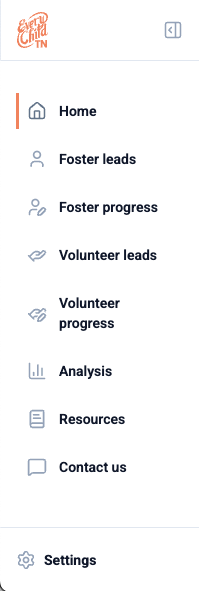
On the left side of your screen, you will see a navigation panel. These are the key pages and destinations:
- Home is the default page, which shows you leads that do not have a designated lead owner yet.
- Foster/volunteer leads shows all leads in a table view, complete with filtering and sorting. You can also access the export CSV feature from this page.
- Foster/volunteer progress allows for bulk editing of lead status dates.
- Analysis shows dashboards showing the statewide Every Child TN results from gap analysis, lead generation, the certification of foster homes, volunteer engagement, and the long-term Network-wide results.
- Resources links to our Freshdesk articles for self-service help.
- Contact us links directly to our submit a ticket form.
- Settings opens a panel for you to log out or submit a ticket.
If you are a network-wide user, you will also see Reporting listed beneath Analysis. Reporting will show the Executive Dashboard.
Was this article helpful?
That’s Great!
Thank you for your feedback
Sorry! We couldn't be helpful
Thank you for your feedback
Feedback sent
We appreciate your effort and will try to fix the article